Microsoft 365 governance, risk and compliance
ASK US ABOUT THIS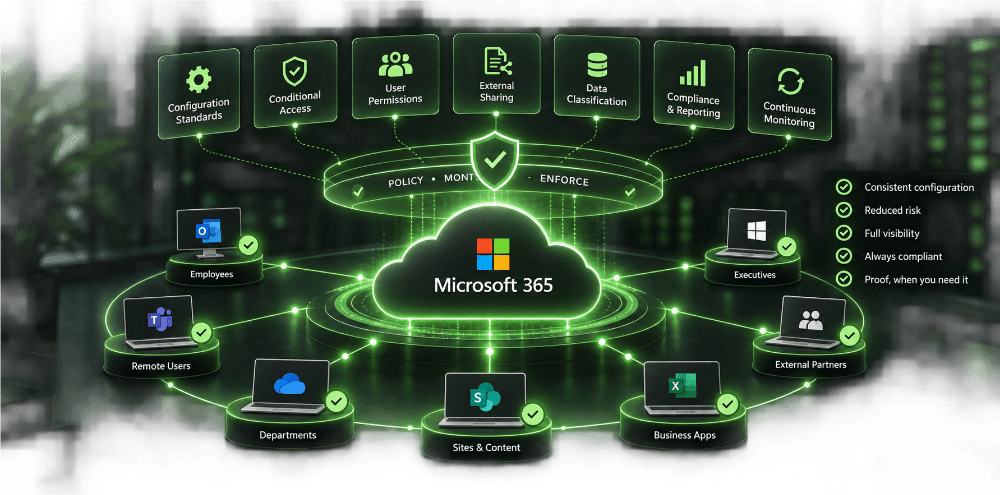
Every mailbox held to the same standard
Email is still the way the vast majority of cyber incidents get in the door. Rather than each mailbox being configured by hand and quietly drifting out of line over time, every user in your organisation is held to one security standard, automatically enforced and continuously checked.
That covers spam and phishing filtering, multi factor authentication enforcement, conditional access rules that block a login attempt from an unrecognised device or country, and encryption controls that stop sensitive information leaving the business by accident. One policy, applied and monitored across every user, with any unauthorised change flagged and corrected before it becomes an incident.
Knowing exactly who can see what, and proving it
Once information leaves email it lives in SharePoint and OneDrive, and that is where most businesses lose visibility. Governance here means controlling who can access, see, share and download company data, and being able to prove that control the moment a regulator, insurer or client asks.
This covers access permissions and external sharing restrictions, sensitivity labelling and classification, and version and retention controls aligned to ISO 27001, NIS2, GDPR and Cyber Essentials Plus. The result is evidence, not just intention, the ability to show, at any point, exactly who can access what and why.
Two tiers, one standard
Every business runs a different Microsoft 365 enviroment, so the service comes in two tiers. Both give you the full platform. The difference is how far the policy engine reaches into your tenant.
Baseline is built for tenants running Microsoft 365 Business Standard. You get full functionality, with policy enforcement matched to what that licence supports.
Premium is built for any Microsoft 365 tenant. It extends policy coverage into Intune, Defender for Office, Defender for Endpoint and Purview, securing identities, endpoints, apps and data end to end.
| Policy area | Standard | Premium |
|---|---|---|
| M365 Admin Center | Limited to M365 Business Standard | Full |
| Entra | Limited to M365 Business Standard | Full |
| Teams | Limited to M365 Business Standard | Full |
| Exchange | Limited to M365 Business Standard | Full |
| SharePoint | Limited to M365 Business Standard | Full |
| Intune | Not included | Included |
| Defender for Office | Not included | Included |
| Defender for Endpoint | Not included | Included |
| Purview | Not included | Included |
What's included, at every tier
Policy management
Automated deployment, backup and restore, and continuous alignment against baseline. Full visibility across every policy in place through Policy Explorer, with AI powered analysis flagging what needs attention. Shared and custom baselines, built once and applied consistently across every tenant.
Admin
Entra ID user and group management covering onboarding, offboarding and password resets, alongside M365 admin shortcuts. Tenant Score and Secure Score dashboards keep posture visible at a glance, with Entra ID recommendations to close gaps as they appear.
Alerting
Real time alerts the moment a setting drifts out of line with policy, alongside changes to Secure Score or alignment score. Coverage extends to admin accounts without MFA, new admin accounts, Apple MDM certificate expiry, app registration expiry, new enterprise app registrations, and missing SPF or DMARC records.
Reporting
A full HTML Tenant Audit report benchmarked against CIS, and a dedicated MFA report, backed by 37 further CSV exports covering the wider estate.
AI & GRC Assessments
Benchmarking against CIS and Essential 8, plus a Copilot readiness assessment that shows exactly what an AI tool would be able to see before it is switched on. Checks run across Entra ID, Defender for Office, Intune, Exchange, M365, Purview and SharePoint, with custom assessments available through the Library.
Platform
REST API access, PSA integrations, and variables, policy tags and tenant tags for managing multiple environments. Single sign on and role based access control, with a full activity log and onboarding links for new tenants.
Service
Implementation, support and account management with software project purchase, GRC ongoing amends with our IT suport package GRC bolt on.
Built on reputation and accreditation you can already trust
Supplied by an already accredited and trusted cybersecurity provider, LoughTec holds ISO 27001 certification, Cyber Essentials and is a Government Commercial Agency (GCA) supplier, backed by a 24/7 Security Operations Centre.
Governance for Microsoft 365 is not a bolt on, it is part of our trademarked ARP® framework protecting your business.
A short assessment shows you exactly how your current Microsoft 365 configuration compares to where it should be, and which tier fits your licence.
Ask LoughTec to find out where your businesses M365 tenant GRC stands today